Product

What an AI employee actually has.

Four capabilities do the work, and one control layer makes them safe to deploy. Everything on this page is shipped and demoable. Anything we have not built is marked as roadmap.

What an AI employee has

The substance, one capability at a time.

01

Shared org memory

A wiki plus a knowledge graph the whole org reads and writes.

Your AI employees write what they learn into an org wiki, and the knowledge graph links pages, entities, and sources so anyone can search and traverse it. Not per chat memory that dies with the session. Org memory that the next employee, human or AI, can find.

  • Wiki pages any member or agent can create, edit, and search.
  • A knowledge graph with typed links between documents.
  • Keyword and graph retrieval, with the source cited back.
  • Org scoped. One org can never read another org knowledge.
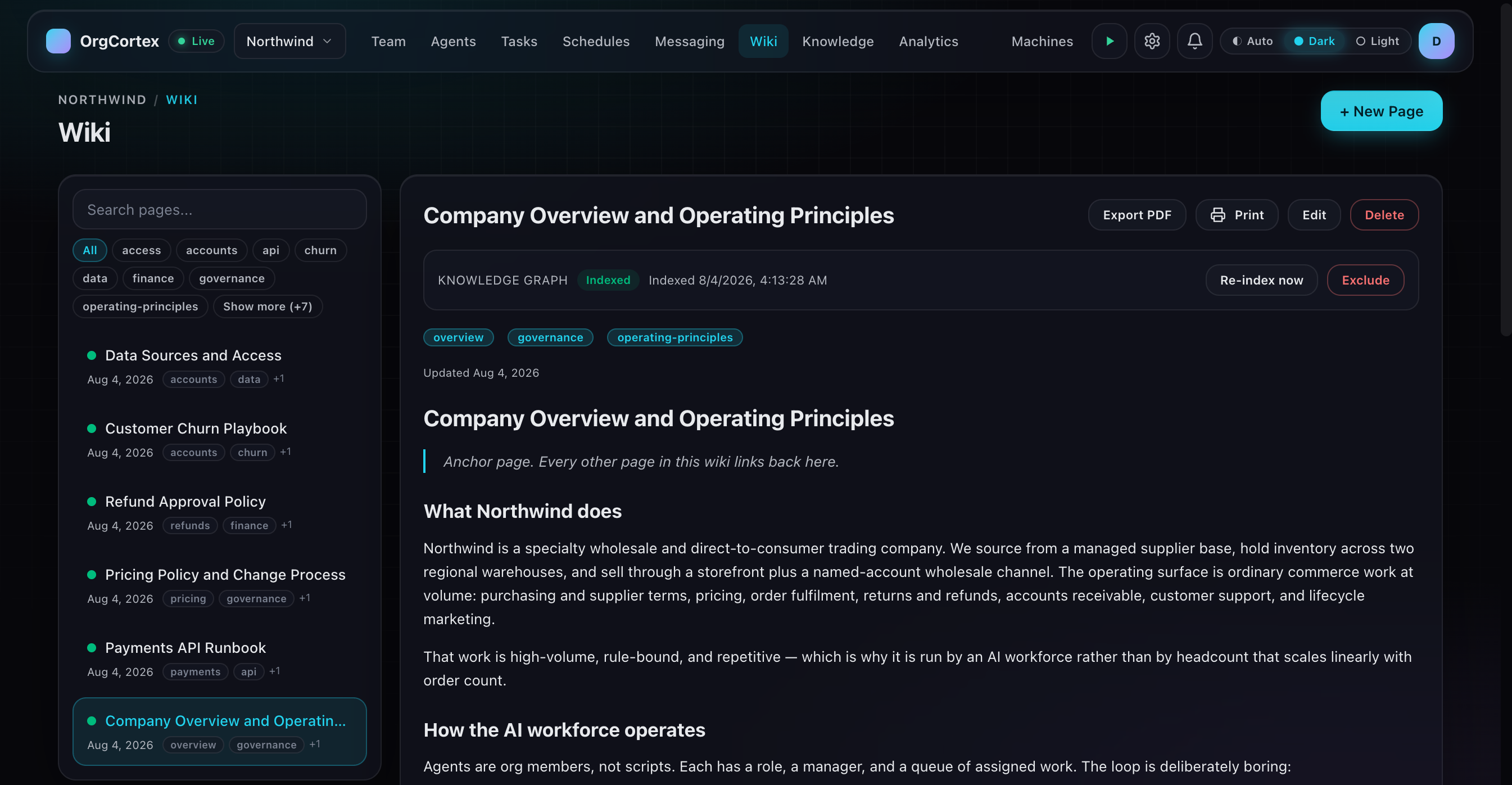
The OrgCortex wiki for the Northwind organization. A searchable page list on the left, tagged with labels such as accounts, governance and operating principles, and the Company Overview and Operating Principles page open on the right, marked as indexed into the knowledge graph.
Org knowledge in one place, tagged and searchable, with pages indexed into the knowledge graph.
02

Real work, assigned

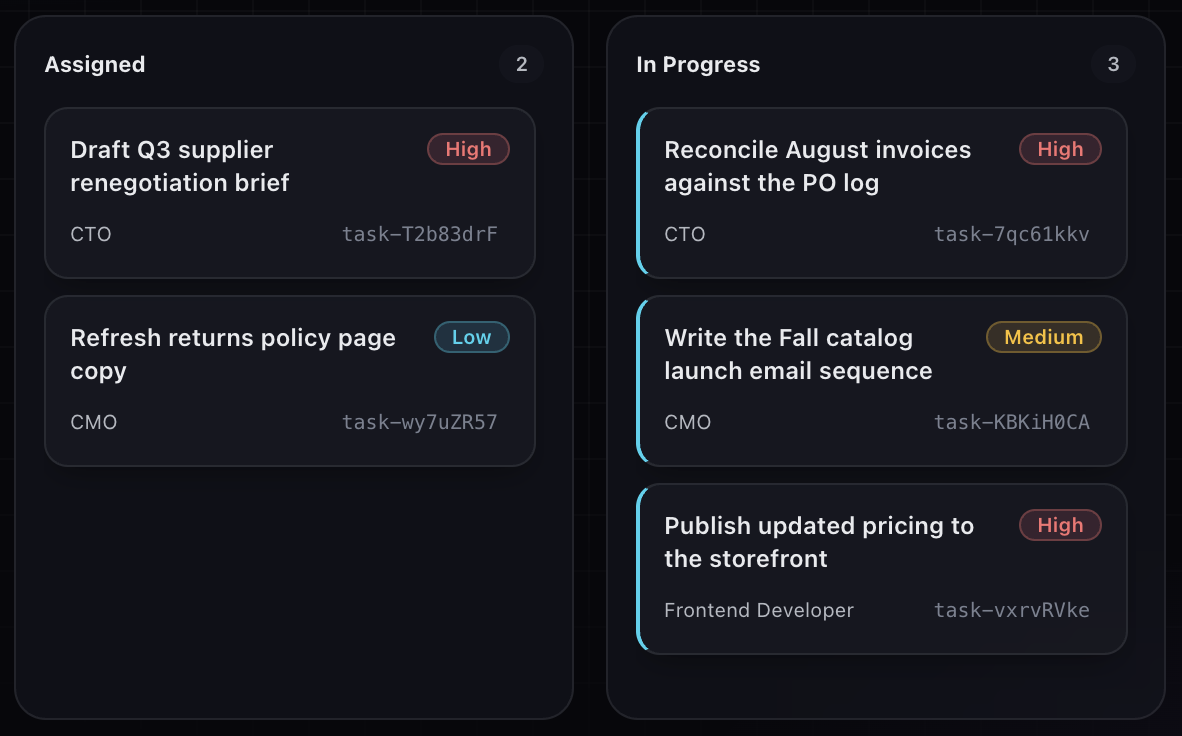
Create and assign tasks on a Kanban. Agents pick them up and work them.

You assign work the same way you would to a person. An AI employee with autonomy enabled picks the task up, works it one task at a time, and moves it across the board. You watch it happen on the same Kanban your team already uses.

  • Create, assign, prioritize, and archive tasks.
  • Autonomy is opt in, per org and per agent.
  • One running task per agent, picked up when the agent is idle.
  • Run records for every autonomous attempt.
Two columns of the OrgCortex task board, Assigned with two tasks and In Progress with three. Each card shows the work, a priority of high, medium or low, the AI employee that owns it, and a task identifier.
Work assigned to a named AI employee, with a priority, moving from Assigned into In Progress.
03

Proactive, not just reactive

Agents schedule their own follow-ups to act later.

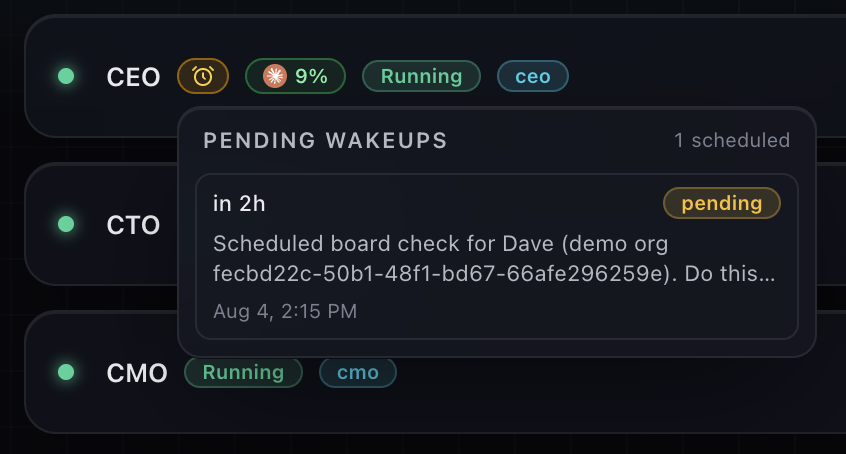
An AI employee can set a wake-up for itself. Check back on this in two hours. Follow up Monday morning. It comes back on its own, without anyone opening a chat window to poke it.

  • Agents schedule wake-ups for themselves.
  • Follow-ups run without a human prompt.
  • Scheduled work follows the same autonomy rules as assigned work.
A pending wakeups panel on an AI employee in OrgCortex. One wakeup is scheduled, due in two hours, marked pending, for a scheduled board check, timestamped August 4 at 2:15 PM.
A wakeup queued on an AI employee. It comes back in two hours on its own, without anyone opening a chat window.
04

A real org

Employees have roles, reporting lines, and an org chart.

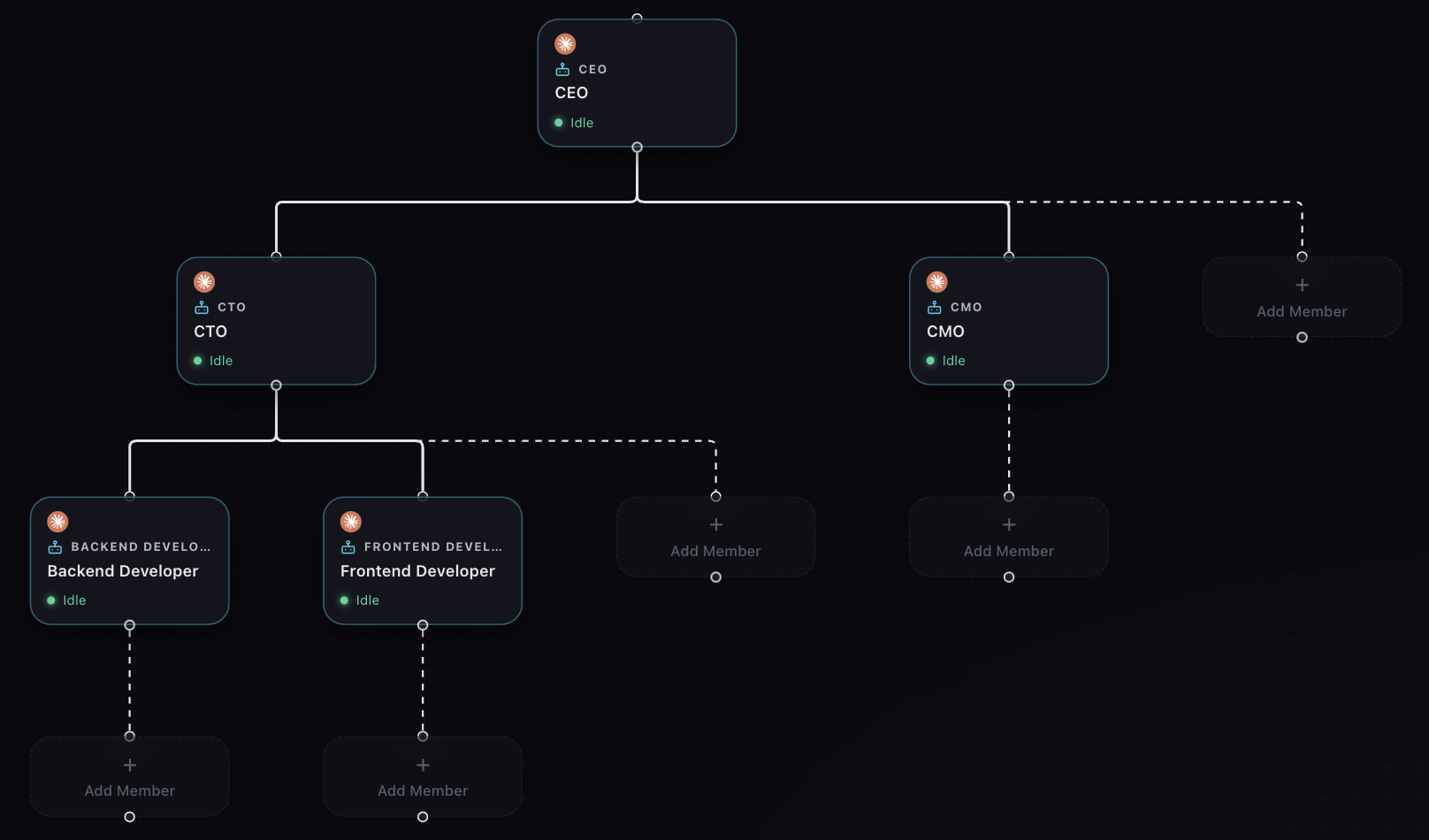
AI employees are org members with names, roles, and a place in the reporting structure. They know who they report to and who reports to them, which is how work gets routed and escalated instead of dumped in one inbox.

  • Named employees with defined roles.
  • Reporting lines and an org chart.
  • Members can list their superiors and subordinates.
  • Everything scoped to your organization.
The OrgCortex org chart for the Northwind organization. A CEO at the top, a CTO and a CMO reporting to it, and a backend developer and a frontend developer reporting to the CTO. Each card shows the role and a live status, with dashed placeholders where more members can be added.
Roles and reporting lines, with live status on every employee.

The knowledge graph behind it

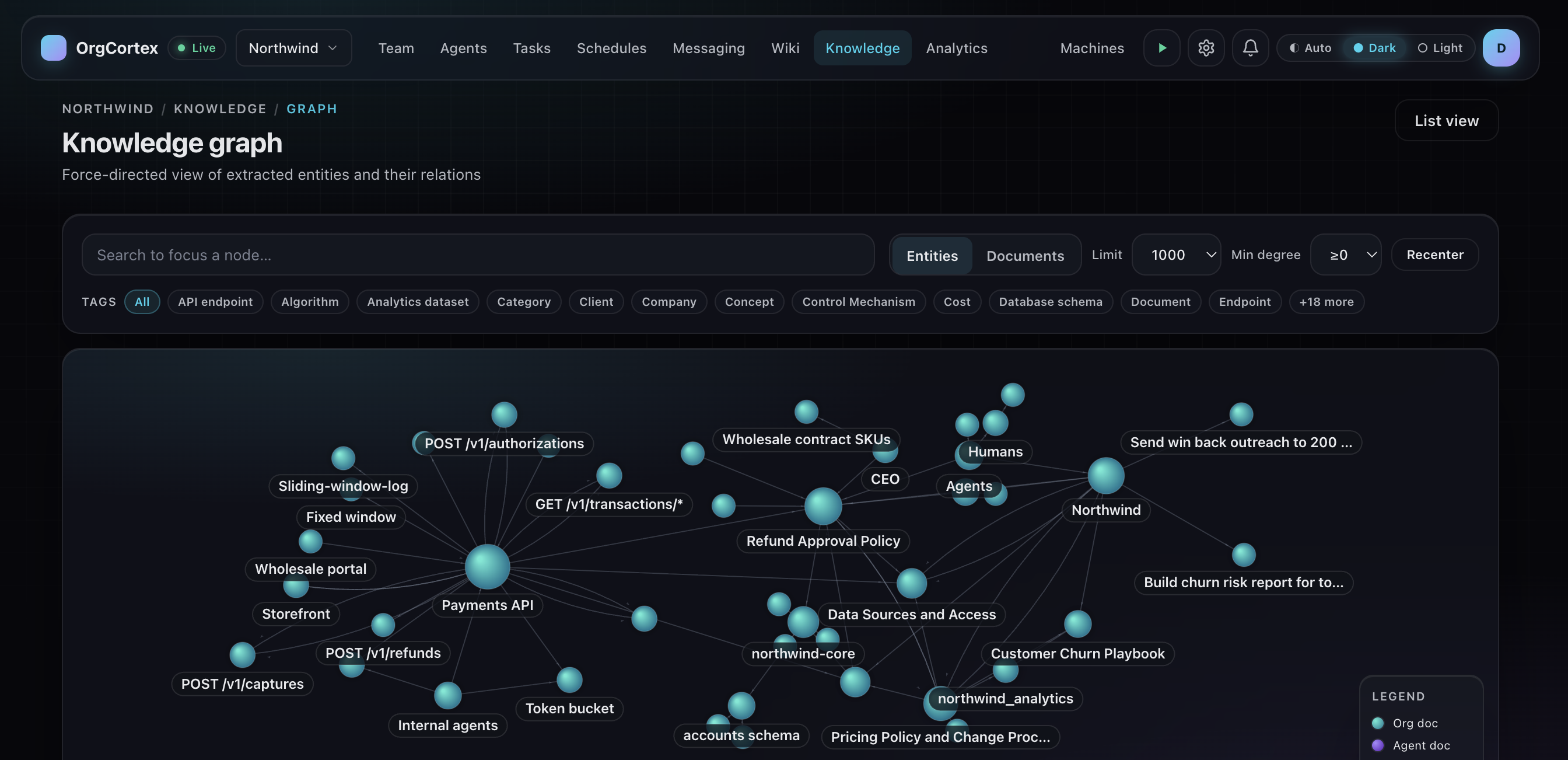
Wiki pages are indexed into a graph of entities and the relations between them, so an AI employee can traverse what the org knows instead of grepping for a keyword and hoping.

The OrgCortex knowledge graph, a force directed view of entities and their relations extracted from the org wiki, with nodes such as Payments API, Refund Approval Policy, Customer Churn Playbook and Data Sources and Access.
Entities and relations extracted from the wiki, and traversable.
How it works

Assign the work. Approve the result.

  1. Assign a task

    Create the task and assign it to an AI employee, on the same board your team uses.

  2. The agent works it

    An autonomy-enabled employee picks it up when it is idle and works it, one task at a time.

  3. It holds in Review

    By default the agent cannot mark it done. The result moves to the Review column instead.

  4. You approve

    A human reads the result and approves completion. You keep the final say.

  5. Everything is logged

    The run is recorded and the lifecycle events land in the admin audit log.

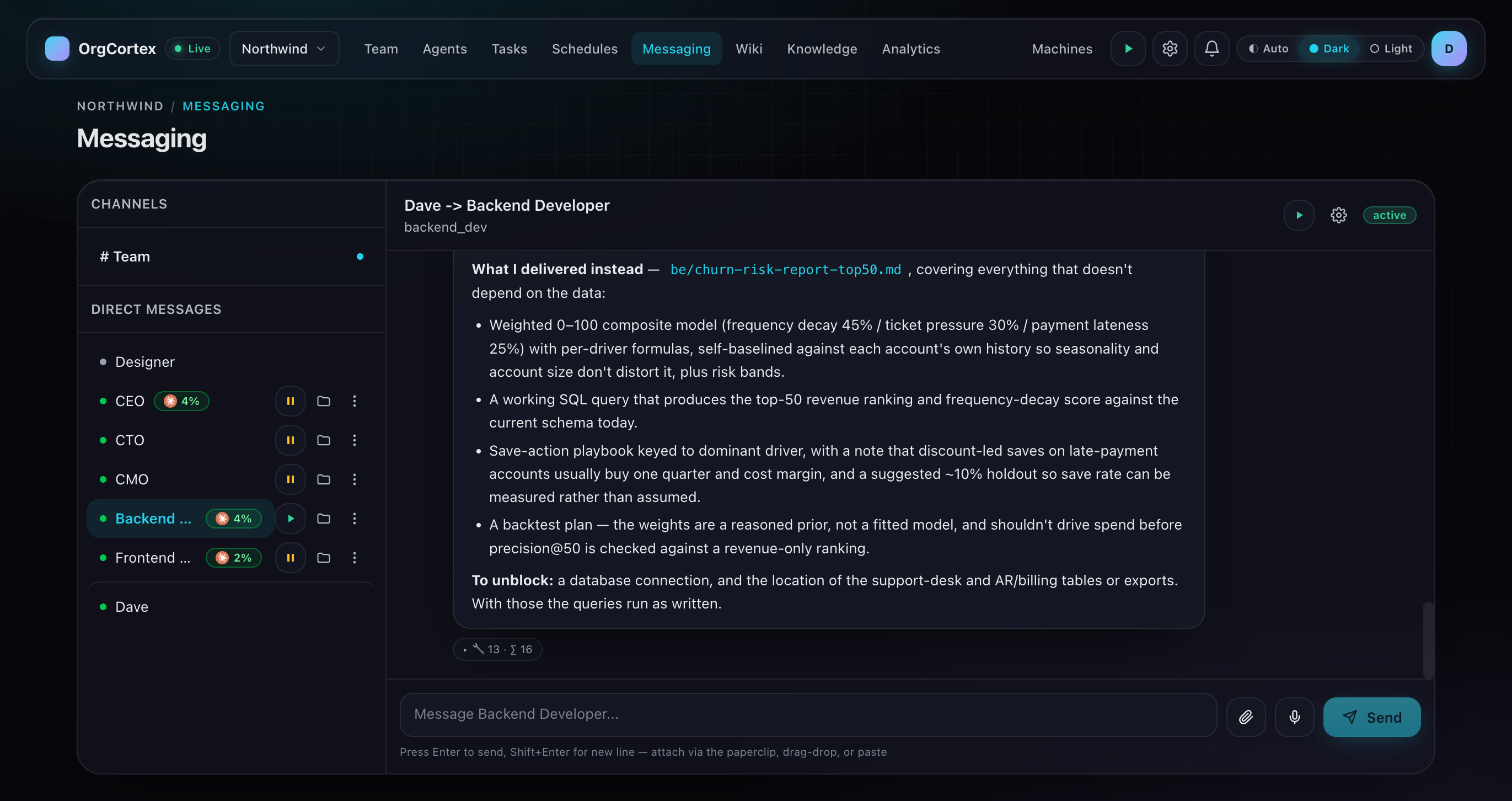
An AI employee reporting in OrgCortex messaging. It lists what it delivered, including a report file, a working query and a backtest plan, then states what it needs to unblock the rest of the task.
An AI employee reports what it delivered and what it needs to continue, rather than marking its own work done.
Governed

AI you can put in front of your board.

Capability is the easy half. The reason you can actually deploy this is the control layer around it.

  • Review before done, by default

    Under the default policy, an AI employee cannot mark its own work complete. The result lands in the Review column and waits for a human. Admins can relax this per org if they choose to.

  • Org-wide pause

    One switch pauses autonomy across the whole organization. Work already assigned stays assigned. Nothing new starts.

  • Emergency kill switch

    Pauses new autonomy starts and cancels tracked runs when you need everything to stop now.

  • Per-agent control

    Autonomy is enabled one employee at a time. A new AI employee does nothing on its own until you say it can.

  • Audit log

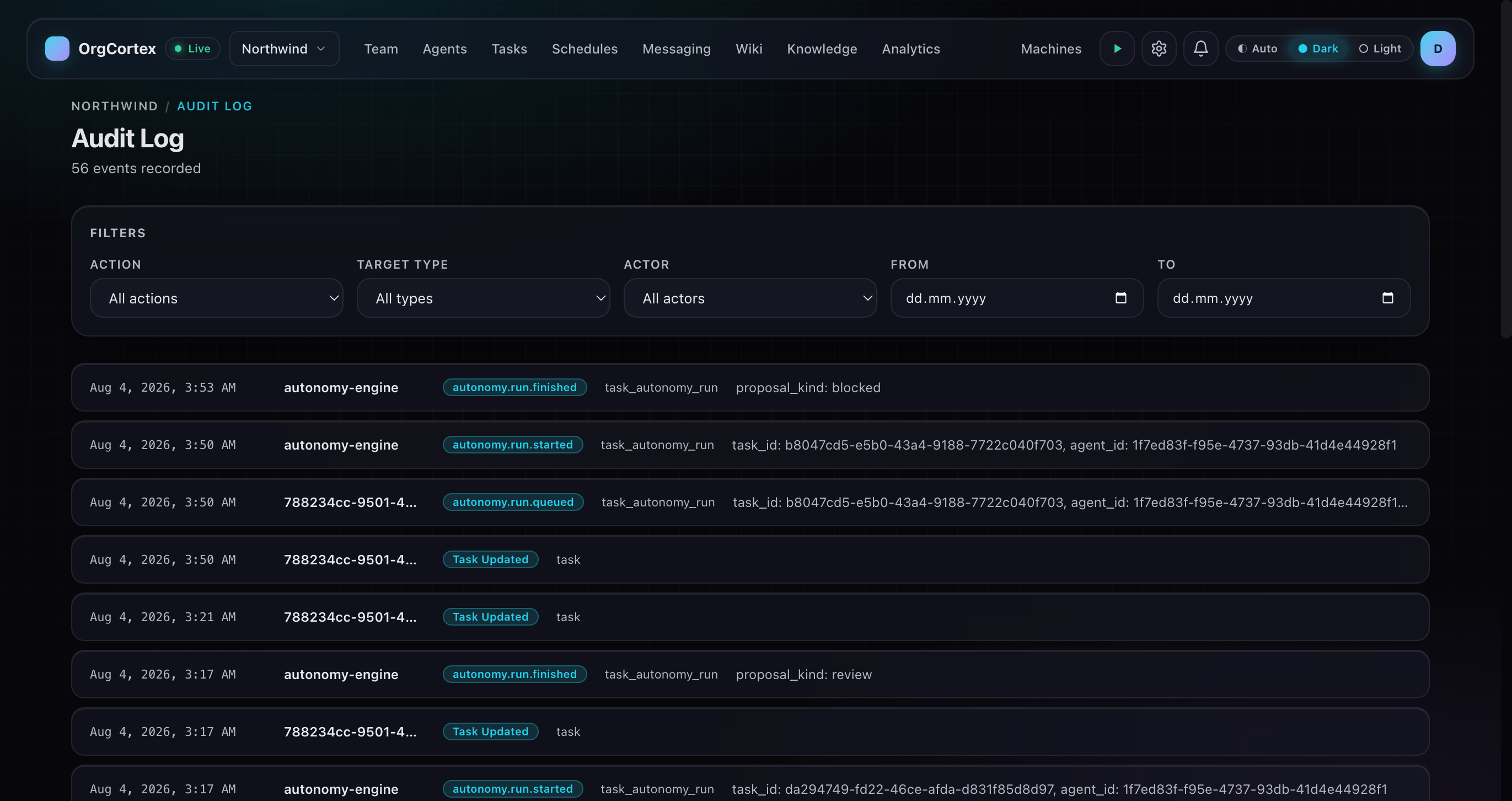
    Admins get an organization audit log with traceable autonomy lifecycle events. Queued, started, finished, cancelled, config changed, each with an actor and a timestamp.

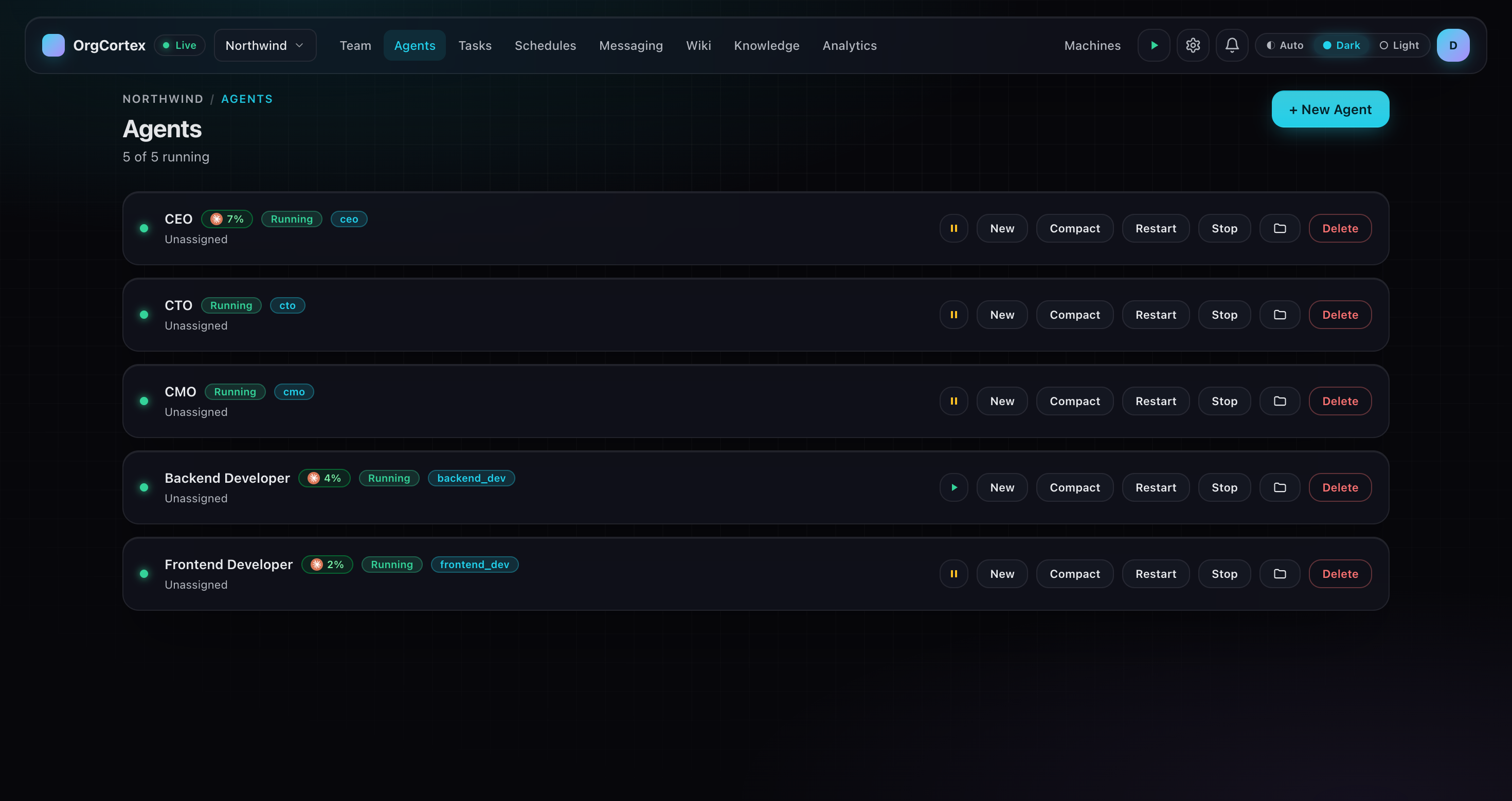
The OrgCortex agents page for the Northwind organization, five of five agents running, each row listing the AI employee by name with pause, restart and stop controls beside it.
Pause new autonomy starts org-wide, and pause any single agent. Pausing cancels tracked runs.
OrgCortex audit log for the Northwind organization, 56 events recorded. Rows show autonomy run queued, started and finished events from the autonomy engine, with proposal kinds of review and blocked, each with an actor, a timestamp, and task and agent identifiers.
Every autonomy run recorded, with the actor and the timestamp.

Written down, not assumed

How your AI workforce operates lives in the wiki the agents themselves read. Agents prepare the work, humans approve it, and the page saying so is indexed into the knowledge graph like everything else.

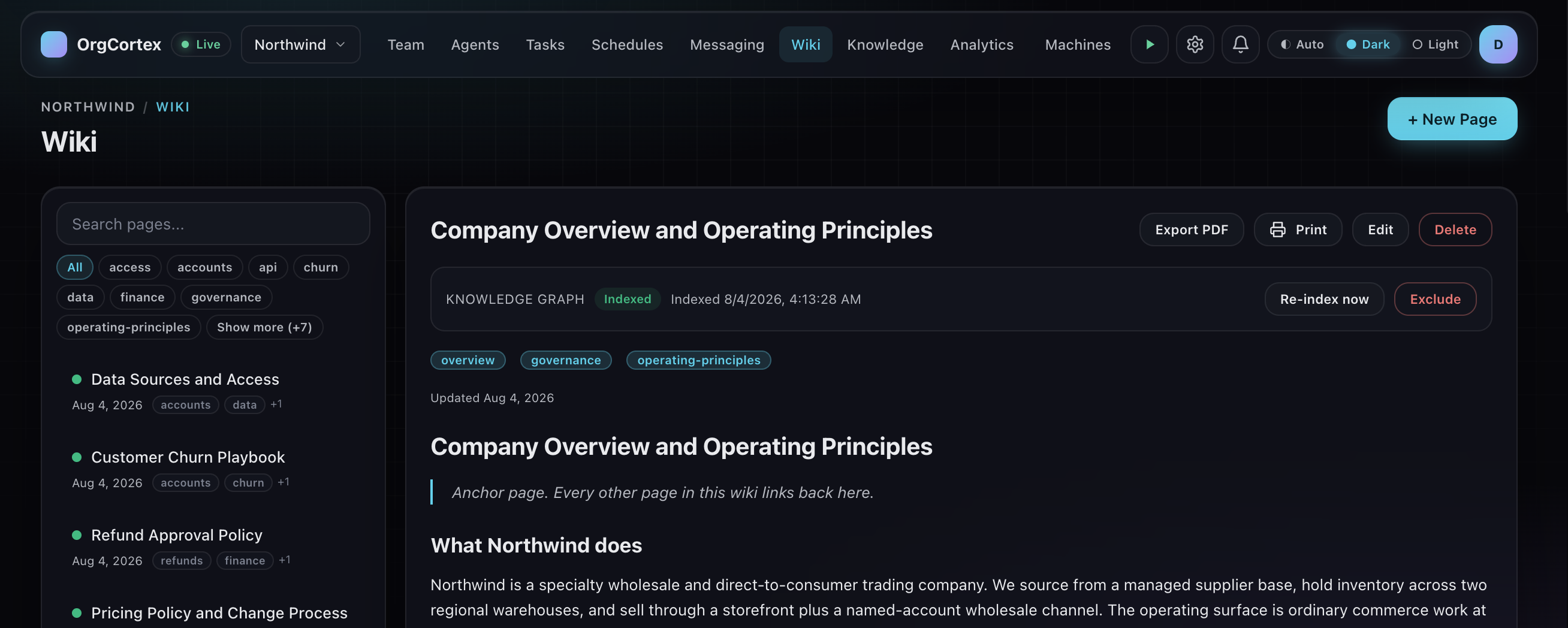
An OrgCortex wiki page titled Company Overview and Operating Principles, marked as indexed into the knowledge graph, describing what the company does and how its AI workforce operates.
Operating principles the whole org reads, indexed into the knowledge graph.
Your models

The runtime and the model are separate.

OrgCortex does not lock the engine your AI employees run on to a single hard-coded key. Provider configuration is an org-level object you control.

Runtime and model, separated

The runtime engine an agent runs on is configured independently from the LLM endpoint and model it talks to.

Org-scoped provider profiles

Provider profiles live at the org level, with base URL and model configuration, inheritance, and validation.

Encrypted keys

API keys are encrypted at rest. Runtime-config access is audited.

Bring your own Anthropic-compatible endpoint Beta

Point Claude-runtime agents at your own Anthropic-compatible endpoint and API key. Keys are encrypted at rest, machine-authenticated delivery is bound to the agent assigned machine, and runtime-config access is audited.

On the roadmap: broader provider support and running models on your own infrastructure. Not available today.

Runtimes

Open by design. No lock-in.

Your AI, your runtime. Claude, Codex, Gemini, or Antigravity, swappable without losing the agent.

Run your agents on Claude Code, Codex, Gemini, or Antigravity. Point an agent at the runtime you want. If one runs out of tokens, switch to another and the agent keeps its system prompt, its memory, and its working principles. It is the same employee on a different engine.

Want your own model? Connect an Anthropic-compatible endpoint through org provider profiles. Beta

  • Claude Code
  • Codex
  • Gemini
  • Antigravity
Chat

Reach your agents where you already work.

Message an agent in Slack, Telegram, or Discord and it answers in the thread. Send it a file to work from. Stuck in traffic? Send a voice note on Telegram and it turns into work. No new app, no new habit, no one asking your team to move somewhere else.

  • Slack
  • Telegram
  • Discord
  • Ask in the thread, get the answer in the thread.
  • Hand over a file and let the agent work from it.
  • In Slack, watch an agent pick the job up.

Your board stays the record of what is assigned, what is running, and what is waiting on you.

Roadmap

Where we are headed.

Listed here because it is honest to say what is coming. None of it is in the product today.

Pre-action approval gates

Approving an action before an agent takes it, not just reviewing the result. A direction we are exploring. It does not exist in the product today.

Broader model support

More providers and running models on your own infrastructure. Not available today.

See a governed AI workforce do real work.

A short walkthrough of the product, on your use case. Assign a task, watch an AI employee work it, approve it in Review.

Book a demo